Using Canvas LMS in K-12? Here’s What It Does Well, and What WBL Teams Still Need

Canvas LMS is one of the most recognized learning management systems in K-12 education. For many districts, it plays an important role in organizing digital instruction, assignments, grades, course communication, parent visibility, and online learning workflows.
That matters. A strong K-12 LMS can help teachers deliver instruction more consistently and give students a central place to access course materials. But for CTE directors, Work-Based Learning coordinators, career readiness leaders, and district administrators, there is a second question that often comes up:
Can Canvas LMS manage the operational side of work-based learning?
The answer is usually not by itself.
Canvas LMS is built primarily for teaching and learning. Work-based learning teams, on the other hand, often need to manage internships, guest speakers, advisory boards, work permits, employer partners, student experience hours, site placements, participation data, equity reporting, and district-wide CTE outcomes.
Those are different workflows.
This article explains what Canvas LMS does well, where it fits in a K-12 district technology stack, and why WBL teams usually need a dedicated platform like the TitanWBL work-based learning platform to centralize work-based learning tracking, partner management, and reporting at scale.
Quick Answer: Canvas LMS is useful for K-12 instruction, course content, assignments, grades, communication, and learning workflows. But work-based learning teams still need dedicated systems for WBL tracking, internship coordination, employer partner management, advisory boards, work permits, student experience reporting, and district-wide career readiness visibility. Canvas LMS helps manage learning. TitanWBL helps manage work-based learning operations.
Table of Contents
What Is Canvas LMS?
Canvas LMS is a learning management system used by schools and districts to organize digital teaching and learning. In a K-12 setting, it can help teachers manage course content, assignments, gradebooks, student communication, online submissions, feedback, and parent visibility.
For many districts, Canvas LMS becomes a central instructional hub. Teachers can post lessons, students can submit work, families can view assignment information, and administrators can support a more consistent digital learning experience across schools.
That role is important because modern districts need more than isolated classroom tools. They need reliable systems that help educators keep course delivery organized across different grade levels, subjects, schools, and programs.
Instructure, the company behind Canvas LMS, describes Canvas as a platform for teaching and learning. Its official Canvas page highlights educator workflows such as SpeedGrader, Gradebook, messaging students, parent visibility, data and insights, and integrations with external tools.
What Canvas LMS Does Well in K-12 Districts
Canvas LMS works well when the district need is instructional management. It is strongest when the workflow revolves around students, teachers, courses, assignments, grading, learning materials, and classroom communication.
For K-12 leaders, the value of Canvas LMS usually shows up in several areas.
1. Course Content and Assignment Management
Canvas LMS gives teachers a structured place to post course materials, assignments, due dates, announcements, and resources. For traditional classroom instruction, this helps reduce confusion and creates a more consistent student experience.
Instead of course materials being scattered across email, paper packets, shared drives, and one-off classroom systems, teachers can use Canvas LMS to centralize instructional delivery.
For students, that means they can log into one place to see what is due, access materials, submit assignments, and review feedback.
2. Grading and Feedback Workflows
One of the biggest reasons schools use an LMS is to support grading and feedback. Canvas LMS includes tools such as Gradebook and SpeedGrader that help teachers review submissions, provide comments, and manage student performance inside a course context.
That is highly useful for academic instruction. Teachers need efficient ways to evaluate assignments, give feedback, and communicate progress to students and families.
However, grading a course assignment is not the same as tracking a student’s internship hours, employer evaluation, training agreement, worksite participation, or advisory board interaction. That distinction becomes important for WBL teams.
3. Student and Family Communication
Canvas LMS can support communication between teachers, students, and families. In a K-12 environment, this matters because families often need visibility into assignment expectations, due dates, grades, and course announcements.
For classroom learning, this visibility can help reduce missed assignments and improve communication. For district leaders, it can also create more consistency in how teachers share course information.
But WBL communication often includes people outside the classroom. Employer partners, job site supervisors, CTE coordinators, work permit reviewers, advisory board members, pathway leads, and district administrators may all be part of the workflow. Canvas LMS was not primarily designed around that broader WBL ecosystem.
4. Integration with the Larger EdTech Stack
Canvas LMS is also valuable because it can connect with many external tools. K-12 districts often use a wide mix of instructional systems, student information systems, assessment platforms, communication tools, and curriculum resources.
A flexible LMS helps reduce friction by becoming part of the district’s broader teaching and learning ecosystem.
Still, integration does not automatically solve workflow fit. A system can integrate with many tools and still not be the right operational system for managing internships, work permits, student experience logs, partner pipelines, and compliance-ready WBL reporting.
Where Canvas LMS Usually Stops for WBL Teams
Canvas LMS usually stops being enough when the work shifts from instruction to program operations. Work-based learning is not just a course. It is a coordinated district program involving students, staff, employers, community partners, experiences, approvals, documentation, and reporting.
This is where many CTE and WBL leaders feel the gap.
A teacher may be able to create a Canvas course for internship students. A coordinator may be able to post forms, assignments, reflection prompts, or resources inside Canvas LMS. But the deeper operational questions usually remain outside the LMS.
For example:
- Which students completed which work-based learning experiences?
- How many hours were completed by pathway, school, grade level, or demographic group?
- Which employers hosted students this year?
- Which partners are active, inactive, or ready for follow-up?
- Which students still need work permits or required documentation?
- Which advisory board meetings were held, who attended, and what programs were represented?
- Which CTE pathways have strong employer coverage and which need more support?
- What data does the district need for reporting, funding, equity analysis, or board presentations?
These are not ordinary LMS questions. They are WBL management questions.
That is why many districts end up with a patchwork system. Canvas LMS handles instructional materials. Spreadsheets track student experiences. Google Forms collect employer information. Shared drives store documents. Email threads manage approvals. One coordinator maintains a partner list. Another school uses a different spreadsheet. Reporting happens at the end of the year through manual cleanup.
That workflow can survive at a small scale. It becomes fragile when a district wants to grow work-based learning across multiple schools, CTE pathways, employer partners, and student populations.
Why Work-Based Learning Requires Different Infrastructure
Work-based learning requires infrastructure that connects classroom learning with real-world career experiences. In CTE and career readiness, WBL can include internships, job shadows, guest speakers, mentorships, clinical placements, school-based enterprises, advisory boards, employer site visits, and other career-connected activities.

Unlike a classroom assignment, a work-based learning experience often involves multiple stakeholders and data points.
A single internship may involve:
- A student
- A pathway or CTE program
- A school site
- A coordinator or teacher
- An employer partner
- A worksite supervisor
- Start and end dates
- Hours completed
- Required forms
- Work permit documentation
- Student reflections
- Supervisor feedback
- Equity and participation reporting fields
That is not just content delivery. It is a program management workflow.
Work-based learning is also closely connected to CTE quality, career readiness, Perkins V planning, and local accountability needs. District leaders need to understand not just whether students are enrolled in a pathway, but whether they are accessing meaningful career-connected experiences. Trusted organizations like Advance CTE describe work-based learning as an important part of career preparation and CTE systems.
This is why many districts separate their LMS strategy from their WBL management strategy. Canvas LMS may remain the instructional layer. A dedicated WBL platform becomes the operational layer.
Canvas LMS vs. Dedicated WBL Platform
The simplest way to understand the difference is this: Canvas LMS helps districts manage learning, while a dedicated WBL platform helps districts manage work-based learning operations. Both can be valuable, but they are not designed for the same primary job.
| District Need | Canvas LMS | Dedicated WBL Platform |
|---|---|---|
| Course content and assignments | Strong fit for lessons, resources, submissions, and due dates | Usually not the main purpose |
| Gradebook and teacher feedback | Strong fit for classroom grading workflows | May capture experience completion, evaluations, or participation data |
| Student internship tracking | Limited unless heavily customized outside normal LMS workflows | Built to track placements, dates, hours, supervisors, and participation |
| Employer partner management | Not typically designed as a partner CRM for WBL teams | Built to organize industry partners, contacts, engagement, and follow-up |
| Work permits and required documentation | May store documents, but workflow management is limited | Built to support WBL documentation and approval workflows |
| Advisory board management | Not a natural fit | Can help organize advisory boards, attendance, programs, and partner participation |
| District-wide WBL reporting | Useful for course data, but not built around WBL reporting needs | Built for WBL visibility across schools, pathways, students, and partners |
| CTE and career readiness operations | Supports instruction connected to CTE courses | Supports the operational backbone of career-connected learning |
What WBL Teams Still Need Beyond Canvas LMS
WBL teams need a system of record for career-connected experiences, not just a digital classroom. A strong work-based learning program must answer operational, reporting, and partnership questions that are difficult to manage inside a traditional LMS.
Student Experience Tracking
Student experience tracking means recording which students participated in which career-connected experiences, when they happened, how many hours were completed, which pathway they connected to, and what outcomes or evidence were collected.
For small programs, a spreadsheet may seem manageable. But as soon as work-based learning expands across multiple schools, CTE programs, coordinators, and employer partners, spreadsheet-based tracking becomes difficult to trust.
District leaders need clean data they can review during the year, not just after a stressful end-of-year cleanup.
Employer Partner Management
Employer partner management is the process of organizing relationships with businesses, nonprofits, public agencies, colleges, community organizations, and other partners that support career-connected learning.
In many districts, this information lives in personal contact lists, old spreadsheets, inboxes, or individual staff memory. That creates risk. If a coordinator leaves, the district may lose valuable relationship history.
WBL teams need to know which partners are active, which pathways they support, who the right contact is, what experiences they can provide, and when they should be contacted again.
Internship and Placement Management
Internship management is one of the clearest areas where Canvas LMS and WBL operations differ.
An internship is not just an assignment. It is a placement that may involve eligibility, matching, documentation, worksite information, schedule details, student hours, supervisor feedback, and completion records.
A district may still use Canvas LMS for internship reflections, course communication, or related instructional materials. But the placement itself usually needs more structured tracking than a course shell can provide.
Advisory Board Management
CTE advisory boards play an important role in connecting programs with industry needs. Districts may need to document meetings, attendance, represented sectors, recommendations, program alignment, and partner participation.
Canvas LMS is not usually where advisory board operations live. These workflows are often managed through documents, spreadsheets, calendars, and manual notes.
A dedicated WBL platform can help districts make advisory board participation easier to organize and easier to connect to the broader career readiness strategy.
Work Permit and Documentation Workflows
Depending on state and district policy, student work experiences may involve work permits, parent or guardian forms, employer agreements, training plans, safety documentation, and other required records.
This is where WBL teams need to be careful. The goal is not to claim that software “guarantees compliance.” District policy, legal review, and state requirements still matter.
The practical goal is to help teams organize required data, reduce missing information, and prepare for reporting or review with less manual scrambling. This connects to broader CTE reporting and program quality expectations under frameworks such as the U.S. Department of Education Perkins V overview.
District-Wide Reporting and Equity Visibility
Career readiness leaders need to see patterns across the district. Which students are accessing WBL opportunities? Which schools are growing? Which pathways have employer coverage? Which student groups may be underrepresented in internships or advanced experiences?
These questions are difficult to answer when WBL data lives in separate spreadsheets, forms, course shells, and staff inboxes.
Canvas LMS may help show learning activity inside courses. WBL teams need visibility across real-world experiences, partners, pathways, and outcomes.
How TitanWBL Fits Alongside Canvas LMS
TitanWBL does not need to replace Canvas LMS. It fills a different role in the district technology stack. Canvas LMS can remain the teaching and learning hub, while TitanWBL becomes the centralized platform for work-based learning management.
TitanWBL helps CTE and career readiness teams track student experiences, manage employer relationships, organize WBL workflows, and pull reports without relying on scattered spreadsheets and manual cleanup.
This distinction matters because many districts already have an LMS. The problem is not that Canvas LMS is weak. The problem is that WBL teams are often trying to force an instructional system to do operational work it was not designed to do.
TitanWBL is built specifically around work-based learning at district scale. That includes workflows such as WBL experience tracking, internship management, employer partner management, advisory board management, dual enrollment management, work permit support, student groups, dashboards, and reporting.
For example, Fresno Unified’s work-based learning case study shows how a large district approached WBL tracking at scale. TitanWBL has been associated with hundreds of thousands of tracked work-based learning experiences, thousands of industry partners, and 50+ CTE programs at Fresno Unified.
That kind of scale requires more than a course shell. It requires a district-wide WBL infrastructure that can support coordinators, teachers, administrators, students, and industry partners with consistent data.
Canvas LMS as the Instructional Layer
Canvas LMS can still be very useful for CTE and WBL-related instruction. A district might use Canvas LMS for:
- Career readiness lessons
- Internship reflection assignments
- Employability skills modules
- Course communication
- Digital submissions
- Teacher feedback
- Student learning materials
Those are natural LMS workflows.
TitanWBL as the WBL Operational Layer
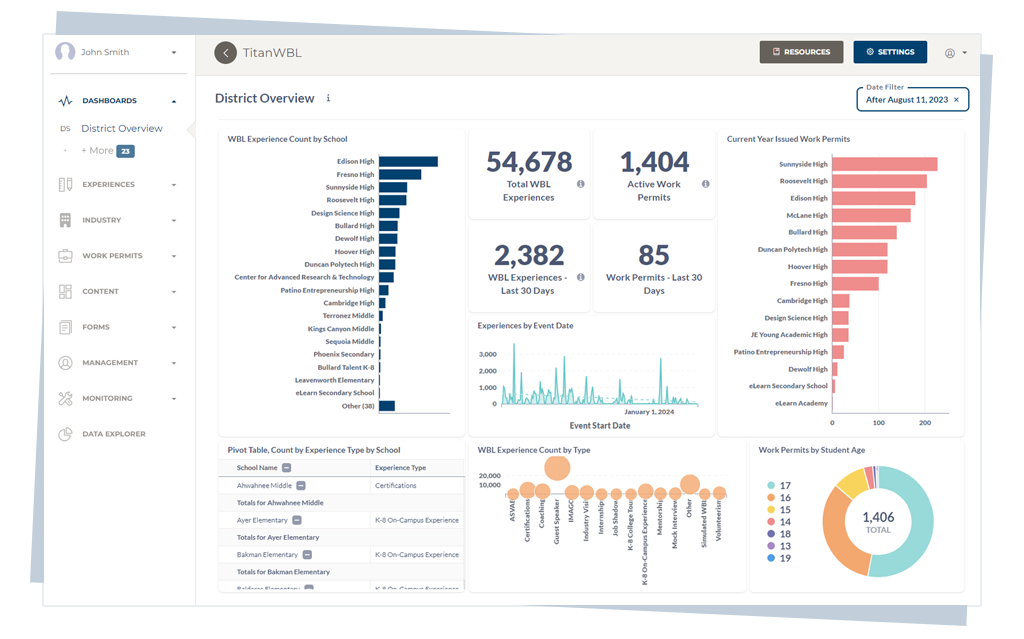
TitanWBL is better suited for the operational questions WBL teams need to answer across the district:
- Who participated in which WBL experiences?
- Which employer partners are active?
- Which CTE pathways have enough partner coverage?
- Which students completed internship hours?
- Which work permits or forms are missing?
- Which schools need more support?
- Which data points are needed for reporting?
- Where are the gaps in access or participation?
In this model, Canvas LMS and TitanWBL are not competing for the same purpose. They support different parts of the student experience.
Why This Matters for CTE and Career Readiness Leaders
CTE and career readiness leaders are being asked to expand opportunity while improving data quality. That combination is hard to manage with disconnected tools.
A district may want to increase internships, expand employer partnerships, strengthen advisory boards, improve work-based learning equity, and prepare better reports for state and federal requirements. But if every school tracks those activities differently, the central office has limited visibility.
This is where many WBL programs hit a ceiling.
The work is happening. Students are meeting employers. Teachers are coordinating events. Business partners are offering opportunities. But the data is fragmented.
That fragmentation creates several problems:
- District leaders cannot easily see total WBL participation.
- Coordinators spend too much time collecting updates manually.
- Employer partner history gets lost across staff changes.
- Reports depend on spreadsheet cleanup instead of live data.
- Equity gaps are harder to identify during the year.
- Program growth becomes dependent on individual staff memory.
Canvas LMS can support the learning side of CTE. But WBL teams still need the operational infrastructure to make career-connected learning visible, measurable, and scalable.
When Canvas LMS May Be Enough
Canvas LMS may be enough when the district only needs to manage course instruction related to career readiness. For example, if a teacher wants to post employability skills assignments, collect internship reflections, or share career exploration resources, Canvas LMS may work well.
It may also be enough for a small pilot where one teacher or one pathway is managing a limited set of activities and reporting is not complex.
But districts should be cautious about building long-term WBL operations entirely inside an LMS if the program is expected to grow.
A small workaround can become a district-wide bottleneck later.
When WBL Teams Should Consider a Dedicated Platform

WBL teams should consider a dedicated platform when work-based learning becomes a district-wide operation instead of a classroom activity.
Some signs include:
- Multiple schools are tracking WBL differently.
- CTE pathways use separate spreadsheets or forms.
- Employer partner data is not centralized.
- Coordinators spend too much time preparing reports.
- Leadership cannot easily see participation across the district.
- Internship hours, documents, or work permits are hard to track.
- Advisory board records are scattered.
- The district wants better visibility into equity and access.
If several of these are true, the issue is probably not an LMS issue. It is a WBL infrastructure issue.
TitanWBL gives districts a centralized way to manage those workflows without forcing coordinators to build their own system out of spreadsheets, forms, and manual follow-up. For districts focused on reporting and documentation, TitanWBL can also support centralized WBL compliance reporting workflows.
How to Evaluate Your Current Canvas LMS and WBL Setup
District leaders can start by mapping which workflows belong in Canvas LMS and which workflows need a dedicated WBL system. This avoids blaming the LMS for gaps it was not designed to solve.
Use these questions as a practical evaluation framework:
Instructional Questions
- Are teachers able to post career readiness lessons and assignments clearly?
- Can students access materials and submit reflections easily?
- Can teachers provide feedback efficiently?
- Can families see relevant course information?
If the answer is yes, Canvas LMS may be doing its job well.
Operational WBL Questions
- Can the district see all WBL experiences across schools in one place?
- Can coordinators track employer partners and contacts centrally?
- Can staff monitor internship hours, placements, and documentation?
- Can leaders generate reports by school, pathway, grade, experience type, or student group?
- Can the district identify gaps in access during the year?
If the answer is no, the district likely needs a dedicated WBL management platform.
CTA: Bring WBL Tracking Out of Spreadsheets
Canvas LMS can be a strong instructional platform for K-12 districts. But work-based learning teams need more than course pages, assignments, and gradebooks.
They need a centralized way to manage student experiences, employer partners, internships, advisory boards, work permits, reporting, and district-wide program visibility.
TitanWBL is built for that layer of work-based learning operations.
If your district already uses Canvas LMS but still relies on spreadsheets, forms, and manual reporting for WBL, it may be time to evaluate what belongs in your LMS and what belongs in a dedicated work-based learning platform.
Schedule a TitanWBL demo to see how a centralized WBL platform can support district-wide tracking, partner management, and reporting.
FAQ
Is Canvas LMS used in K-12 districts?
Yes. Canvas LMS is used by many K-12 schools and districts as a learning management system for digital instruction, course content, assignments, grades, student communication, and family visibility.
Can Canvas LMS manage work-based learning?
Canvas LMS can support some instructional parts of work-based learning, such as assignments, reflections, course resources, and teacher feedback. However, it is not usually built to serve as a full WBL management system for internships, employer partners, work permits, advisory boards, experience hours, and district-wide reporting.
What does Canvas LMS do well?
Canvas LMS does well with course management, digital assignments, grading workflows, teacher feedback, student communication, parent visibility, and integration with other teaching and learning tools.
What do WBL teams still need beyond Canvas LMS?
WBL teams often need student experience tracking, internship management, employer partner management, advisory board tracking, work permit workflows, compliance-ready reporting, and district-wide visibility into career-connected learning participation.
Does TitanWBL replace Canvas LMS?
No. TitanWBL does not need to replace Canvas LMS. Canvas LMS can remain the instructional learning platform, while TitanWBL supports the operational side of work-based learning management.
Why is work-based learning tracking different from course tracking?
Course tracking usually focuses on assignments, grades, and instructional progress. Work-based learning tracking focuses on real-world experiences, employer partners, student hours, documentation, placements, advisory boards, and program reporting across schools and pathways.
Can districts use Canvas LMS and TitanWBL together?
Yes. A district can use Canvas LMS for teaching and learning workflows while using TitanWBL to centralize WBL tracking, partner management, internship coordination, and reporting.
When should a district consider dedicated WBL software?
A district should consider dedicated WBL software when work-based learning expands across multiple schools, pathways, coordinators, and employer partners, especially if reporting still depends on spreadsheets, email threads, manual forms, and disconnected records.
Conclusion
Canvas LMS has an important place in the K-12 technology stack. It helps districts organize digital instruction, course materials, assignments, grading, feedback, and communication.
But work-based learning is bigger than a course workflow.
WBL teams need to manage real-world experiences, employer relationships, internships, work permits, advisory boards, student participation, pathway data, and reporting requirements. Those workflows require a different kind of system.
The best approach is not to ask Canvas LMS to do everything. The better approach is to let Canvas LMS support teaching and learning, while a dedicated platform like TitanWBL supports the operational backbone of work-based learning.
For districts looking to scale career-connected learning without relying on scattered spreadsheets and manual reporting, TitanWBL gives WBL teams a centralized place to track, manage, and report on the work that happens beyond the classroom.
Ready to see how your district can centralize WBL tracking, partner management, and reporting? Schedule a TitanWBL demo and explore how a dedicated work-based learning platform can fit alongside your existing district systems.
Sources